Product / Variant stock Warning Notification
New Stock Warning Notifications (All Portals)
A new Stock Warning Notification feature has been added to the Portal / PAMS module.
You can now configure a stock warning level for any product. When the stock on hand for a product is equal to or lower than its configured warning level, an automatic email notification will be sent.
This feature monitors all products across all portals, helping you stay on top of low stock levels regardless of which portal the product belongs to.
Benefits:
- Automatic low stock email notifications
- Monitors products across all portals
- Helps prevent products from running out of stock
- Improves inventory management and replenishment planning
Release Note:
- Email notifications are only sent for products or variants where Stock Warning Levels, are greater than 0 (zero). This prevents notifications for items that are not stock-managed or do not have a warning level configured.
- A single notification email is sent covering all portals that have products or variants with stock warnings. If stock warning statuses change (for example, new items reach their warning level or existing warnings are resolved), an updated notification email will be sent reflecting the latest stock warning information across all portals.
- Stock levels will only update after the Warehouse has updated the Order with Packed items and click Update Button. Until then the item/s are not removed from stock on hand

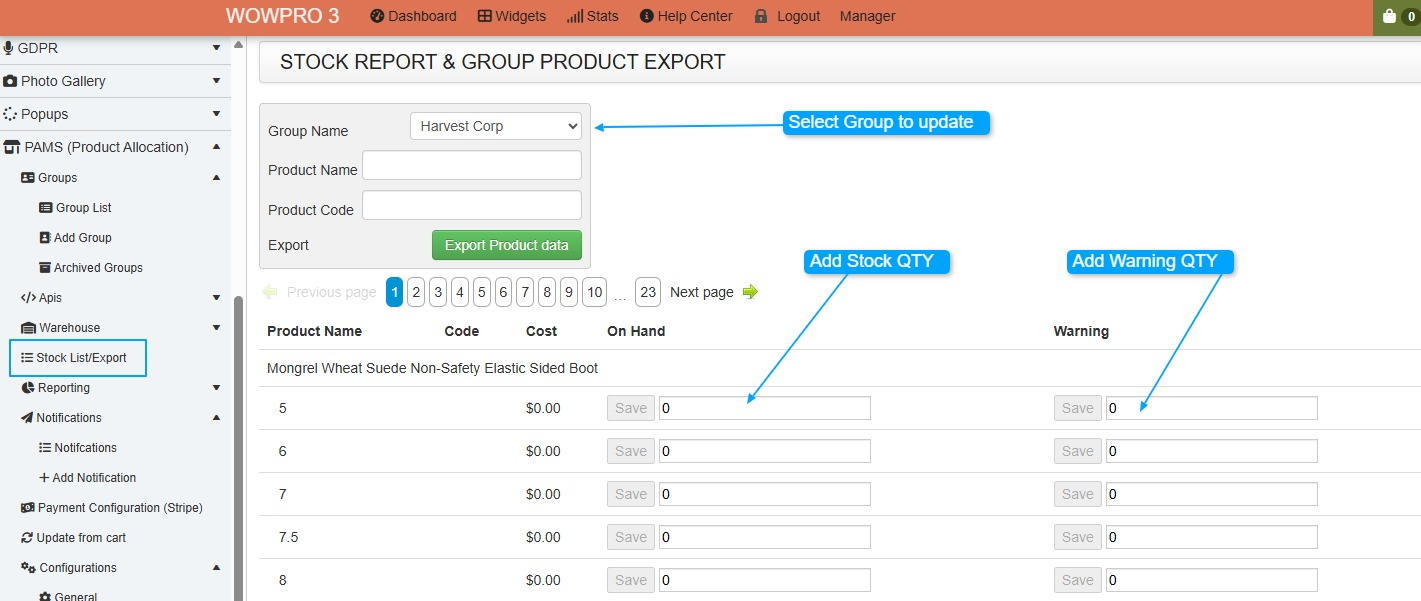
How to add to multiple products - (Best way to do it)
Stock List/Export, then Select the Group Name
If you know the product codes, you can also use this to filter.
Once you add a number into the fields, it will Auto Save.
How to add to a single product

Sample of the email stock notification message
