Assigning a Landing Page Template to a Menu Item
Overview
You can now choose a specific landing page template for each menu item on your website. This allows you to create focused landing pages without the standard site menus, helping guide visitors along a set path.
Why Use This Feature
Landing pages without menus are ideal for:
- Marketing campaigns
- Product launches
- Special promotions
Any scenario where you want visitors to focus on a single goal
How It Works
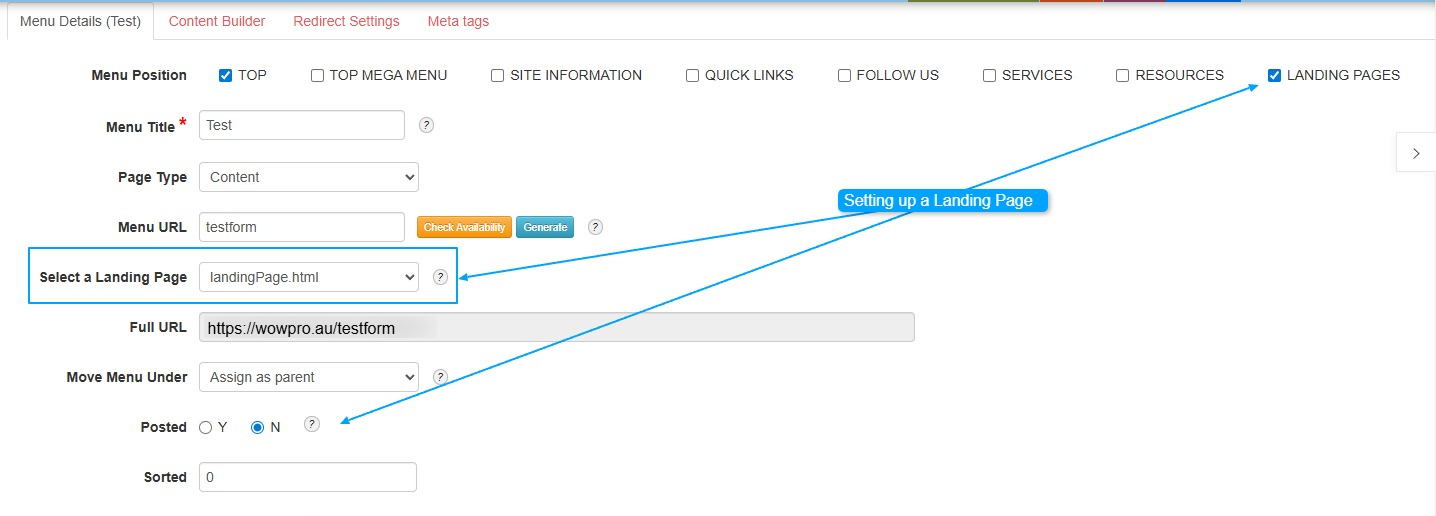
- Go to the menu item you want to edit.
- Select the landing page template you want to use for this menu item.
- If you choose a template without menus, visitors will only see the content on the landing page, without links to other pages.
- Save your changes.
Benefits
- Directs visitors to the content or action you want them to take
- Reduces distractions from other pages or menu items
- Increases engagement and conversion rates
Example Use Case
If you have a menu item for a new product promotion, you can assign a landing page template that highlights the product and encourages sign-ups or purchases, without other menu links that might distract your visitors.
Copy the FULL URL field and paste into your browser, to test the landing page.
Currently landing page to use is landingPage.html